

Documentation Index
Fetch the complete documentation index at: https://docs.formly.ai/llms.txt
Use this file to discover all available pages before exploring further.
2026-04-30
A new dashboard for your team New dashboardThe new organization dashboard gives your team one place to see organization and device work at a glance. It brings overall roadmap progress, documents currently routing, urgent due-soon work, open tasks, recent team activity, and unresolved comments into a single device-aware view.Focused viewsUse dashboard filters to narrow each card to the work that matters right now, while the page keeps counts and rows responsive as you move between organization-wide and device-specific context.
New dashboardThe new organization dashboard gives your team one place to see organization and device work at a glance. It brings overall roadmap progress, documents currently routing, urgent due-soon work, open tasks, recent team activity, and unresolved comments into a single device-aware view.Focused viewsUse dashboard filters to narrow each card to the work that matters right now, while the page keeps counts and rows responsive as you move between organization-wide and device-specific context.Improvements
Improvements
- Improved agent performance so assistant workflows respond faster
Fixes
Fixes
We have been busy fixing small issues and cleaning up the app.
2026-04-21
Functional groups and streamlined navigationImproved traceability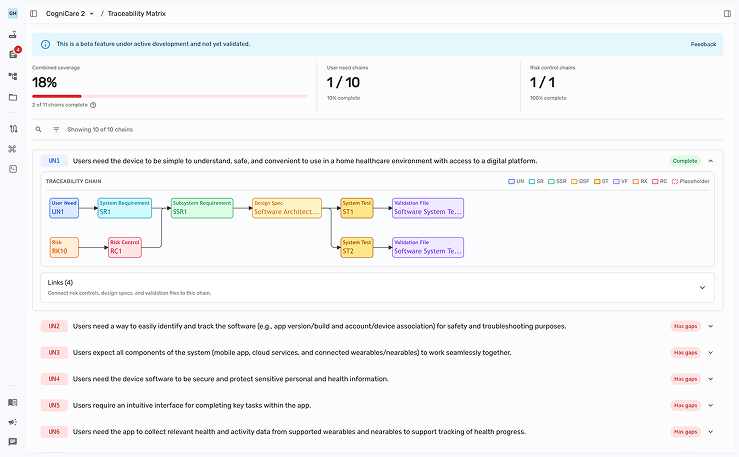 Improved the usability and presentation of the traceability feature. It also moved to the top level navigation on the left sidebar.Functional groups
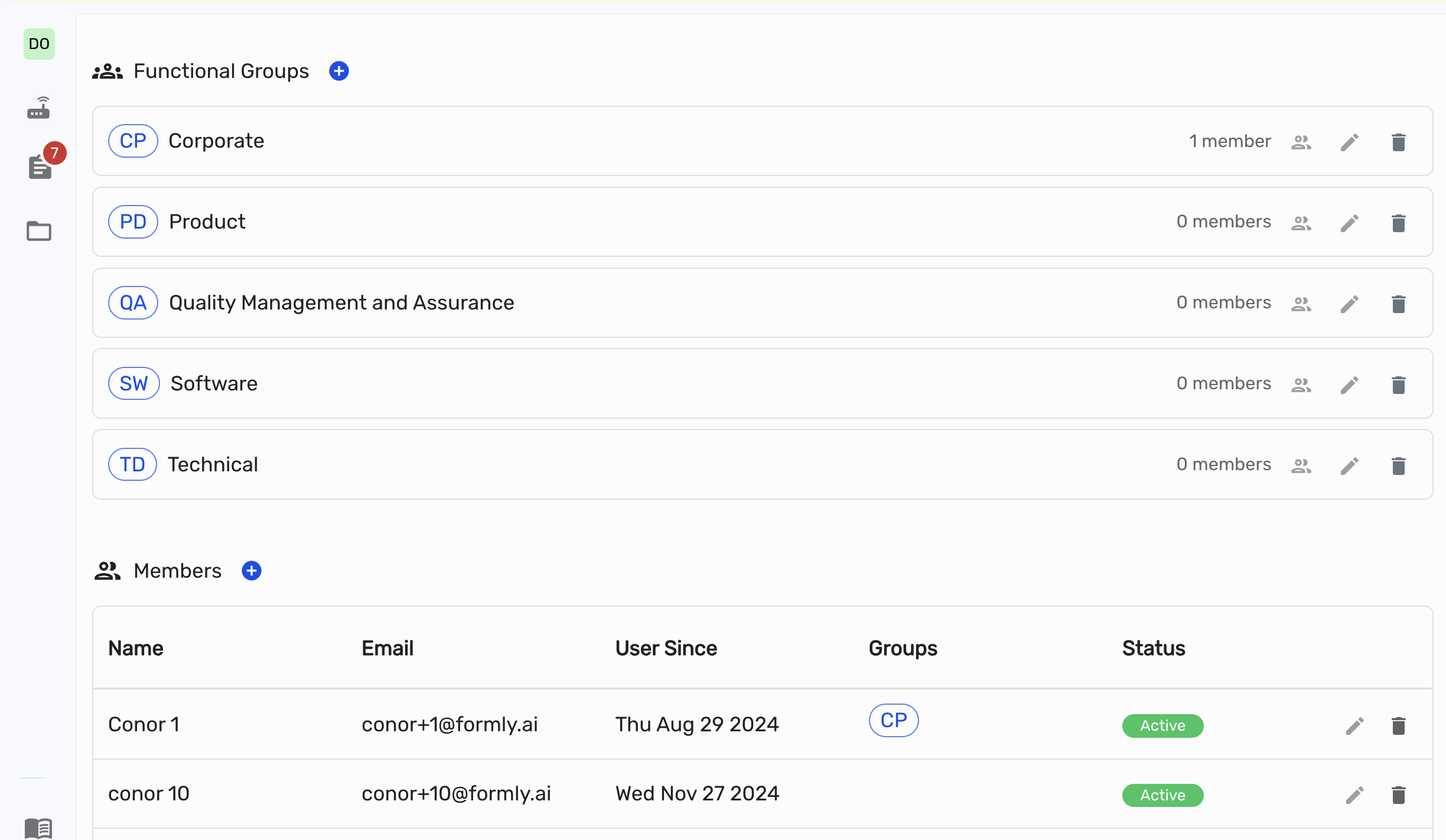 Organizations now come seeded with the usual defaults (QA, Software, Regulatory, and more) and you can create, rename, and delete your own groups from the organization settings. Add users to one or many groups so documents carry the right ownership context.Streamlined navigation
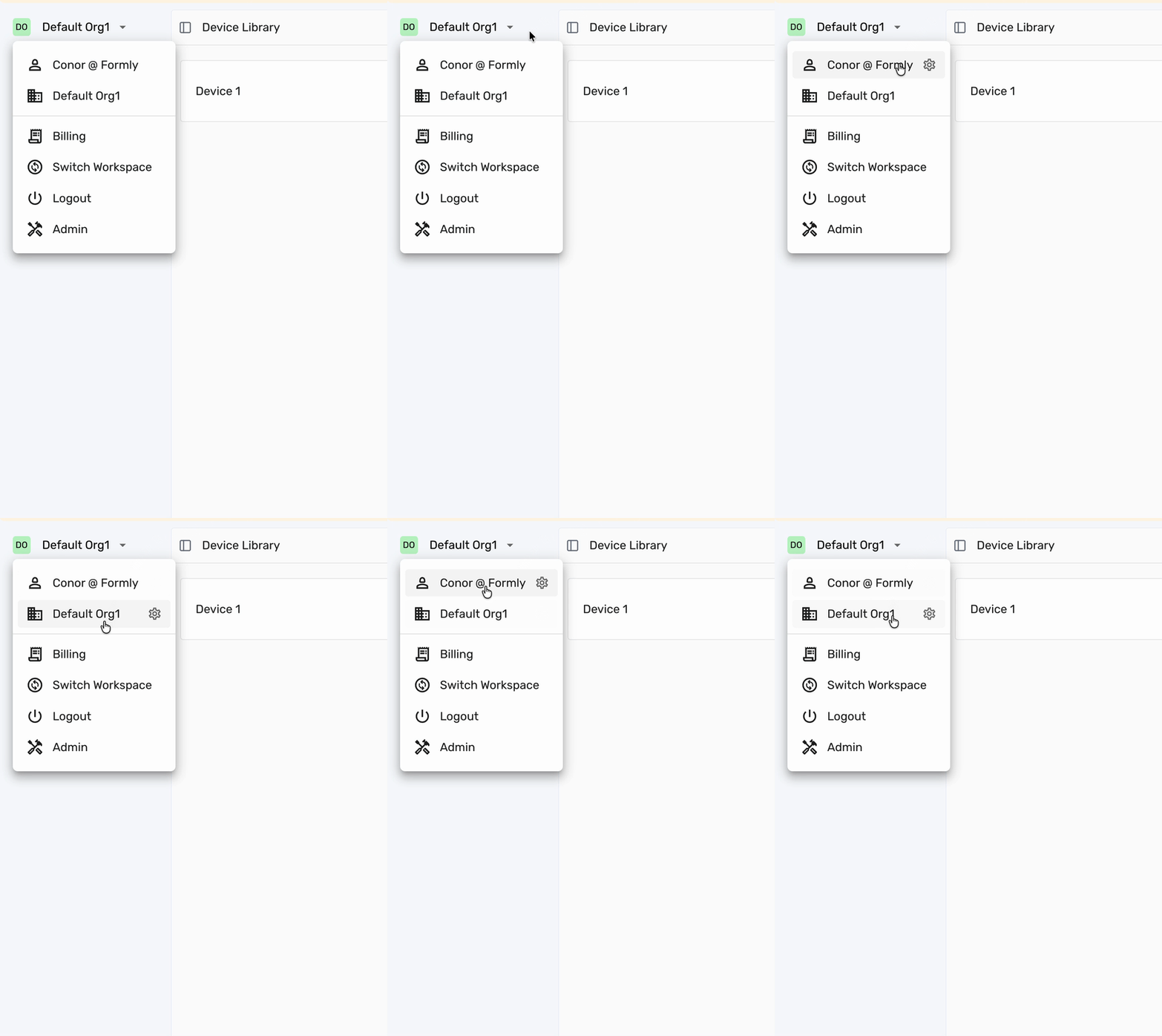 Organization and user settings now live in a cleaner single menu so it is quicker to jump between workspaces and manage your account.
Improved the usability and presentation of the traceability feature. It also moved to the top level navigation on the left sidebar.Functional groupsOrganizations now come seeded with the usual defaults (QA, Software, Regulatory, and more) and you can create, rename, and delete your own groups from the organization settings. Add users to one or many groups so documents carry the right ownership context.Streamlined navigationOrganization and user settings now live in a cleaner single menu so it is quicker to jump between workspaces and manage your account.Improvements
Improvements
- Replaced the hardcoded functional group list with a real org-scoped entity so groups can be renamed and extended per organization
- Sorted organizations in the switch workspace menu
Fixes
Fixes
- Fixed workspace menu stacking over the revision dropdown
- Fixed terminal tooltip offset in the collapsed menu
2026-04-20
A new place for all your documents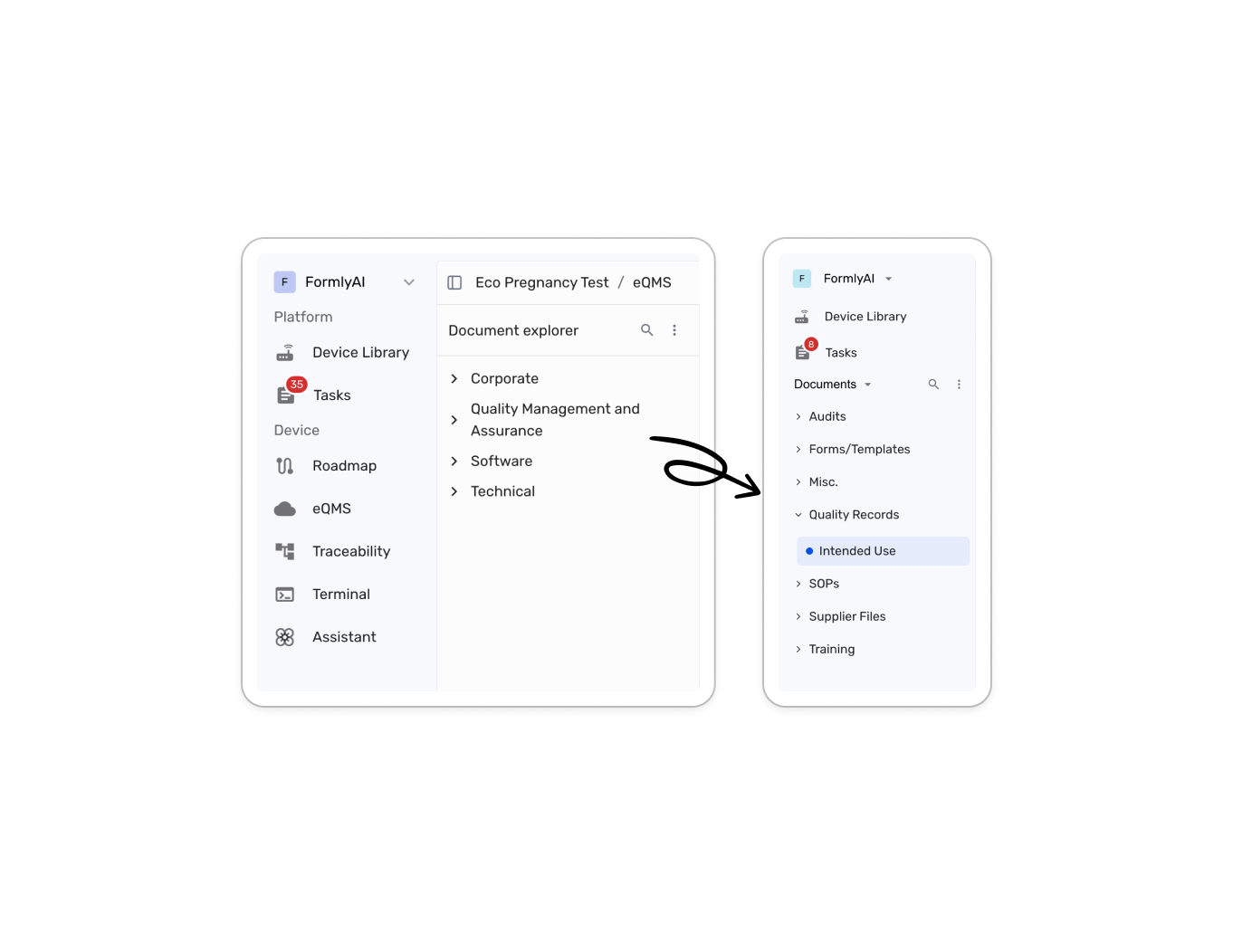 Document workspaceAll documents across all devices now live in a dedicated space in the left menu with a full folder tree for both organization-level and device-specific content. You can create, rename, and delete folders by right-clicking on them, drag and drop folders and documents to reorganize the structure, and use native-feeling range multi-select to manage several items at once.Search and document actions
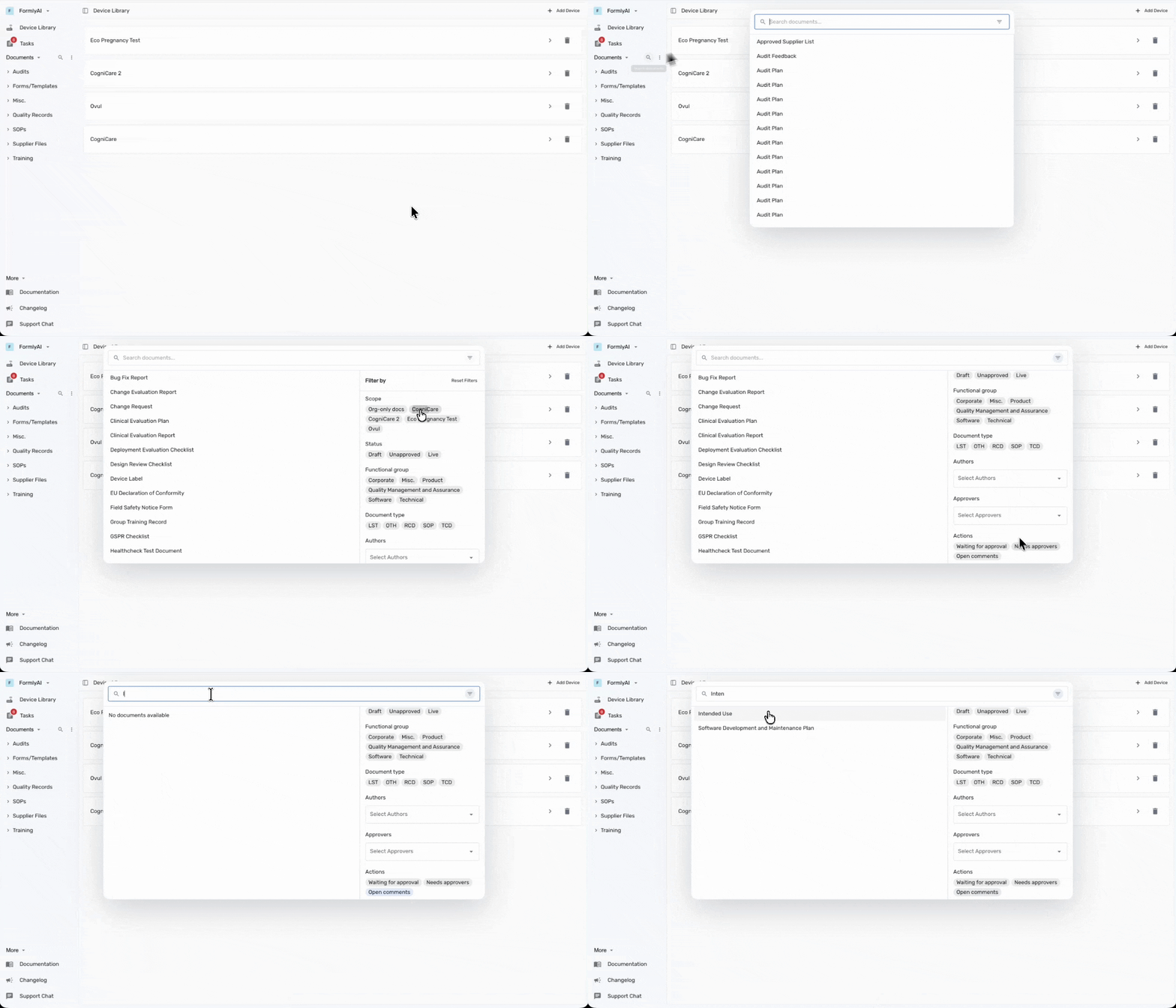 The new documents area also brings org-wide search and faster document actions into one place. You can create or upload documents from the documents menu and search across the full document set with filters for scope, status, functional group, document type, approvers, authors, and outstanding actions.Device-aware workflowsDevice context is now easier to control across the app. Switch the active device directly from the roadmap and the agent chat. The updated document navigation makes it clearer whether a document belongs to a device or is managed at the organization level.
Document workspaceAll documents across all devices now live in a dedicated space in the left menu with a full folder tree for both organization-level and device-specific content. You can create, rename, and delete folders by right-clicking on them, drag and drop folders and documents to reorganize the structure, and use native-feeling range multi-select to manage several items at once.Search and document actionsThe new documents area also brings org-wide search and faster document actions into one place. You can create or upload documents from the documents menu and search across the full document set with filters for scope, status, functional group, document type, approvers, authors, and outstanding actions.Device-aware workflowsDevice context is now easier to control across the app. Switch the active device directly from the roadmap and the agent chat. The updated document navigation makes it clearer whether a document belongs to a device or is managed at the organization level.Improvements
Improvements
- Extended global device switching into roadmap and agent flows for faster context changes
Fixes
Fixes
We have been busy fixing small issues and cleaning up the app.
2026-03-26
Custom data key references in the raw editorCustom data key referencesYou can now insert custom data key references directly in the document editor by typing
@ and choosing a data key. References render inline inside the document. Click the edit icon to adjust a value right inside the document and it gets updated automatically wherever it is used.Improvements
Improvements
- Document editor usability
Fixes
Fixes
We have been busy fixing small issues and cleaning up the app.
2026-03-16
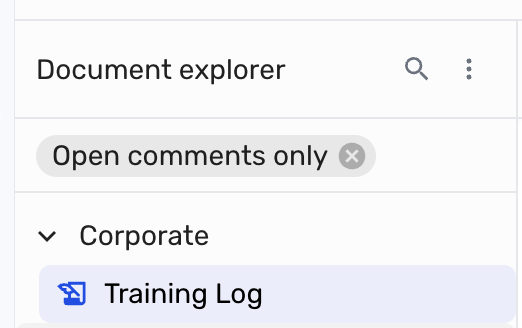
Stronger document control and traceabilityTraceability (beta)We added a branching traceability graph with broken-link visibility so you can follow relationships more easily and spot gaps before they turn into release issues.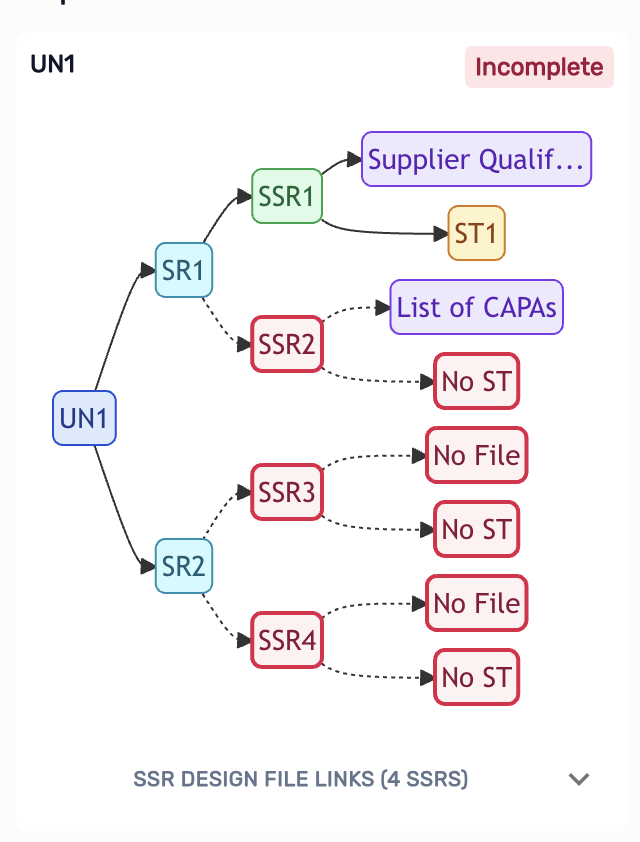 Document workflowsSignature tables now work in both custom documents and uploaded files. You can also edit custom document metadata, create linked documents directly from task detail, filter the explorer down to documents with unresolved comments, and reliably copy document content from the top bar.Collaboration and approvalsCommenting and approval flows are more robust. Previously commented text can now be reselected correctly, teammates can resolve comments regardless of who created them.You can also now filter the explorer down to documents with unresolved comments. Click the more options icon on the explorer to see the filter.
 Assistant and organization updatesThe assistant now defaults to GPT-5.4, MCP integrations got a more complete setup experience, selected context chip titles stay readable.Organizations can now store a company description that the agent can use as context. Go to the organization settings to add or edit the description.
Document workflowsSignature tables now work in both custom documents and uploaded files. You can also edit custom document metadata, create linked documents directly from task detail, filter the explorer down to documents with unresolved comments, and reliably copy document content from the top bar.Collaboration and approvalsCommenting and approval flows are more robust. Previously commented text can now be reselected correctly, teammates can resolve comments regardless of who created them.You can also now filter the explorer down to documents with unresolved comments. Click the more options icon on the explorer to see the filter.Assistant and organization updatesThe assistant now defaults to GPT-5.4, MCP integrations got a more complete setup experience, selected context chip titles stay readable.Organizations can now store a company description that the agent can use as context. Go to the organization settings to add or edit the description.Improvements
Improvements
- Prevented users from deleting themselves from the organization users table
- Required onboarding name fields before advancing
- Added
isCanadasupport alongside the existingisUKdevice behavior - Improved answer-item save flow so Next and Generate do not skip unsaved edits
- Fixed ordered-list numbering after nested sublists in the raw editor
Fixes
Fixes
- Fixed custom upload flows where RCD options did not behave correctly with user uploads
- Fixed missing
isUKhandling in affected device import paths - Fixed a blank approval popup and improved approval panel behavior
- Fixed oversized device-label images in custom document rendering
- Included dependency, security, and build reliability cleanup across the app
2026-02-12
Better collaboration and integrationsComments
We now have comments for documents in the eQMS. Mark any text to add a comment. Tag your collaborators to get their attention and iterate on documents together. Coming soon: Tag formly to get support by the agent to help you resolve questions or use it to adjust documents considering comments from your collaborators.Tasks
We have added a new Tasks feature to the app. Tasks are a way to track the progress of your work and collaborate with your team. You can now assign document creation tasks to yourself or others and track their progress. You can also add deadlines to make sure your tasks are completed on time.Integrations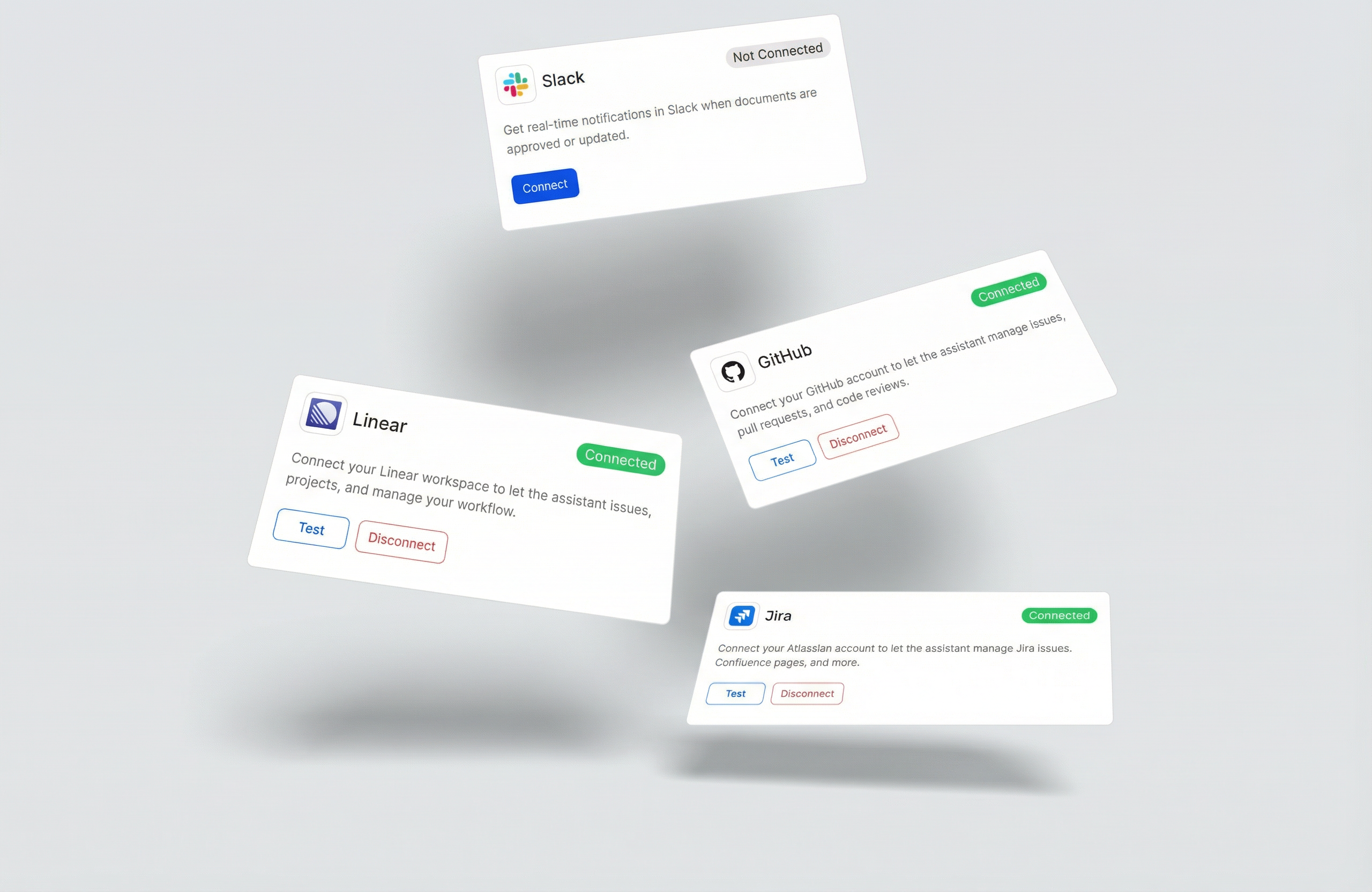 We have added a new Integrations feature to the app. You can now connect your Linear account to the app and use the agent to help you resolve questions or use it to adjust documents considering comments from your collaborators. To connect an integration head to User Settings -> Integrations.
We have added a new Integrations feature to the app. You can now connect your Linear account to the app and use the agent to help you resolve questions or use it to adjust documents considering comments from your collaborators. To connect an integration head to User Settings -> Integrations.Improvements
Improvements
- Right click actions to add and remove columns and rows in the table editor
- Added a changelog modal to the app
Fixes
Fixes
We have been busy fixing small issues and cleaning up the app.